ESI's 10-Step Cloud VoIP
Implementation Process

Our comprehensive approach covers everything from initial coordination to training, activation, and post-implementation support. Dedicated Project Coordinators and Customer Success Account Managers add a personalized touch to the process, ensuring customer satisfaction and a smooth transition.


Hosted_VoIP_2023_Excellence


Proud Winner of a 2023
Internet Telephony
Hosted VoIP Excellence Award
!
 
This was given to ESI for delivering an EXCELLENT experience: from Sales, to Implementation, to Solution Performance, to Support! With ESI you know you're receiving world-class treatment and communications excellence.


1. Project Coordinator Assignment

No Customer Actions Required 

Once assigned, your Project Coordinator (PC) will begin preparations for implementing your new ESI solution. As your primary point of contact for this phase, they will help guide you through the process, ensuring key milestones and deadlines are met, in addition to answering any questions you have.

2. Schedule & Prepare for Configuration Planning Meeting

The information below is required for the project to begin. Please review the information below and have it ready for your call with the ESI Project Coordinator.

Customer Actions Required | Schedule Call with Project Coordinator & Complete Worksheet provided by PC. Be prepared to cover the following topics:

  • First & Last Names for ALL USERS
  • Email Addresses for ALL USERS (must be the business' domain)
  • Preferred Extension Numbering (3-digit or 4-digit).
    • Note: Extensions cannot begin with a zero, or be 211, 311, 411, 911, or 988.

The following items will also be discussed on the call.

  • Physical Addresses for each location that will receive service. Note: This does not include remote employees that will have phones at their homes.
  • Confirm the list of Porting Phone Numbers are correct, and properly labeled with their purpose (i.e. Main Number, Rollover, etc.)
    • If no numbers are being ported and ESI is providing all new numbers, please identify which will be the Main and/or Fax Number (if applicable).
  • Verify which site contact will be notified in 911 is dialed from a location.
  • If your order contains an online Faxing solution, provide the email address where faxes will be delivered.
  • Will the Premier User need SMS Texting enabled? If so, confirm if it is for the main number or a direct number.

RECOMMENDED | Discuss with your team before the call.

  • Call Routing for both Business Hours & After Hours.
  • Should inbound calls ring to one person, a group of extensions, or to an Auto Attendant Greeting with options for reaching specific users/departments.
  • If an Auto Attendant Greeting or Voicemail Greeting will be used, please a script typed out if you require specific verbiage. ESI can also provide examples, if requested.

3a. Perform CUSTOMER NETWORK TEST (48 HOUR)

Customer Actions Required | Perform Assigned Network Test

Watch overview video

Before any equipment touches your network, it is imperative to know that it can handle the impact of voice traffic. This test evaluates your Local Area Network (LAN) and Internet connection to give us a good understanding of its overall health and ability to support Voice Over Internet Protocol (VoIP). Many providers skip this step of the process, which can easily lead to poor quality of service, however ESI mandates a passing score for every customer network to help ensure a successful implementation and optimum voice quality.

To maximize your network's performance, please refer to the Network Configuration for Optimum VoIP before starting the tests.

Important Note: an ESI Network Engineer will email the primary account contact with important details you'll need to run the test.

  • To avoid any delays in your activation, please follow the instructions below to install the application as soon as possible.
  • Once installed notify ESI (by replying to the email) that you are ready to start the network assessment test. Please keep in mind this test will be invalid after five business days.
  • Please do not run the test on weekends, holidays, or any other days outside of your normal business hours.

Important Notes:

  • Be sure that your computer is physically connected to the Internet using a network cable (CAT5 or better), not wi-fi.
  • Do not install the application on a computer being used as a server. Doing so will impact your test results.
  • The test will run for 48 hours in 15-minute intervals.
  • Do not shut down the computer or allow it to enter hibernation mode during the testing period, as this will stop the test.

Step-by-Step Instructions:

  1. Click the "Network Test Link" that you received in the email from us.
  2. Click the "Windows" button.
  3. For your unique test ID, please use the "Record ID" included in the email you received from us. This helps us identify your test results.
  4. Click the "Submit" button.
  5. Click the "Download a Windows App Encoded" link to download the Satellite application.
  6. Locate the file in your Downloads folder.
  7. Double-click on the .exe file to the run the satellite application on the computer being used for the network test.
  8. To properly examine your test results in a timely manner, we request that you provide us with the following information:
    • Modem (make/model)
    • Router (make/model)
    • Switch (make/model)

3b. Perform CUSTOMER NETWORK TEST (Snapshot)

Customer Actions Required | Perform Assigned Network Test

Watch overview video

Before any equipment touches your network, it is imperative to know that it can handle the impact of voice traffic. This test evaluates your Local Area Network (LAN) and Internet connection to give us a good understanding of its overall health and ability to support Voice Over Internet Protocol (VoIP). Many providers skip this step of the process, which can easily lead to poor quality of service, however ESI mandates a passing score for every customer network to help ensure a successful implementation and optimum voice quality.

To maximize your network's performance, please refer to the Network Configuration for Optimum VoIP before starting the tests.

Important Note: an ESI Network Engineer will email the primary account contact with important details you'll need to run the test.

  • To avoid any delays in your activation, please install it as soon as possible, and once installed notify ESI (by replying all to the email) that you are ready to start the network assessment test. Please keep in mind this test will be invalid after five business days.
  • Please do not run the test on weekends, holidays, or any other days outside of your normal business hours.

Important Notes:

  • Be sure that your computer is physically connected to the Internet using a network cable (CAT5 or better), not wi-fi.
  • Do not install the application on a computer being used as a server. Doing so will impact your test results.
  • Do not shut down the computer or allow it to enter hibernation mode during the testing period, as this will stop the test.

Step-by-Step Instructions:

  1. Copy/paste the "Network Test Link" from the email you received from us into the browser address bar, then follow the prompts to install the BCS application. Once the BCS application is installed, the network assessment test is ready to start.
  2. To begin the test, click the button labeled "Click to start test" in the upper left of the image. Although the image appears as if it's working, it is just an animated graphic. The test will not running until the grey button is clicked and a "name" is entered in the next step.
  3. Click the "Windows" button.
  4. For your unique test ID, please use the "Record ID" included in the email you received from us. This helps us identify your test results.
  5. Click the "Submit" button.
  6. To properly examine your test results in a timely manner, we request that you provide us with the following information:
    • Modem (make/model)
    • Router (make/model)
    • Switch (make/model)

4. Attend Configuration Planning Call

Customer Actions Required | Attend Scheduled Conference Call

On this call we will cover timelines, expectations, configurations of the solution, and other key details needed to launch the installation. If you have not yet scheduled this meeting with your PC, you should do so at your earliest convenience to ensure your project is not delayed.

5. Equipment Ships to Customer

No Customer Actions Required

Once the equipment has been properly provisioned, it will be shipped to the respective customer location(s). There is no action the customer needs to take at this time.

Important Billing Notice: Now that your order has shipped, you can expect to receive an invoice for your one-time non-recurring charges (NRC) next month. 

6. DIY User Training

No Customer Actions Required

While awaiting your equipment to arrive, here are some additional videos and documents relating to the use of your phones. You can find additional information in our website's Resource Library.

Click on the picture of your device below to see related resources. If you're still unsure of your product model, you can check the label under the phone for the phone's name.

ePhone 3™ Phone

ESI-ePhone-3-v2__Blue-Home-Screen

ePhone 4x™ Phone

ESI-ePhone-4X-v2__Blue-Home-Screen


ePhone 8™ Phone

ePhone8_product-image__1250px


ePhone X-1™ Phone

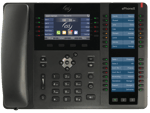
ESI-ePhone-X-1__Blue-Home-Screen


eConsole™ User Portal

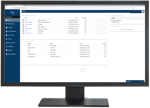
ESI-eConsole-on-monitor__500x363


7. ESI Cloud Service Activation

Customer Actions Required | Plug in Phones & Attend Scheduled Activation Call

On this call we will ensure that all items thus far in the process are completed BEFORE activating your new ESI Cloud service. Please make sure that all of your ESI phones are plugged-in at their respective stations before this call occurs. Once your Project Coordinator confirms a "GO" status, your services will become active.

8. Final Phone Number Porting

Customer Actions Required | Do not cancel existing services until ESI confirms all numbers have ported

During this phase, ESI is working to move all of your existing phone numbers are moved ("ported") to ESI. Please do not cancel your existing phone services until after ESI has confirmed that all numbers have been ported successfully.

9. Handoff to ESI Customer Success Team

No Customer Actions Required

Now that you're officially an ESI customer, your primary point of contact for any account changes or updates will be the Customer Success Team. This dedicated team is here to ensure that your experience with ESI is great. They can also assist with any add-on orders or basic account questions.

How to request Support as a Customer

Dial *611 from your ESI phone.

Call Cloud Support at 800-850-2151.
Monday-Friday 7AM-7PM Central.

Send an Email: tsc.cloud@esi-estech.com

Visit the Resource Library on our website for videos and product documents.

10. Verification Call

Customer Actions Required | Verify with Customer Success & Provide NPS Feedback

After your implementation has been completed, the ESI Customer Success team will wait a set period of time before reaching back out to you. At this time, a representative will ask questions regarding how your solution is working thus far and facilitate any changes that are needed. Approximately six (6) months after implementation, the Authorized Contact will receive an NPS (Net Promoter Score) survey, which will gauge your overall Customer Satisfaction with your ESI Cloud solution.

X
X